.png&w=3840&q=75)
The Ultimate Guide on How to Cash Out/Withdraw Your Earnings from Poppo Live
By: Julie
19 Dec 2025
You’ve put in the hours, you’ve entertained the crowd, and you’ve finally seen those points stack up. Now comes the best part of the grind—getting paid. If you are reading this, you are probably staring at your earnings dashboard wondering how to turn those digital numbers into cold, hard Peso.
Don't worry, fam. As someone who has navigated the ins and outs of the local streaming scene here in the Philippines, I’ve got you covered. Cashing out shouldn't be a puzzle. In this guide, I’m breaking down exactly how to cash out/withdraw your earnings from Poppo Live, avoiding the headaches and getting straight to the payout.
Understanding the Poppo Economy: Points vs. Coins
Before we dive into the withdrawal process, let’s clear up a common confusion for newbies. In Poppo Live, there are two main currencies:
- Coins: You buy these to send gifts to other streamers.
- Points: You earn these when you receive gifts or complete tasks.
You can only withdraw Points. The standard conversion rate usually hovers around 100,000 Points = $10 USD. This is the minimum threshold you need to hit before you can initiate a withdrawal. If you haven't hit that 100k mark yet, keep grinding!
Step-by-Step: How to Withdraw Money from Poppo Live
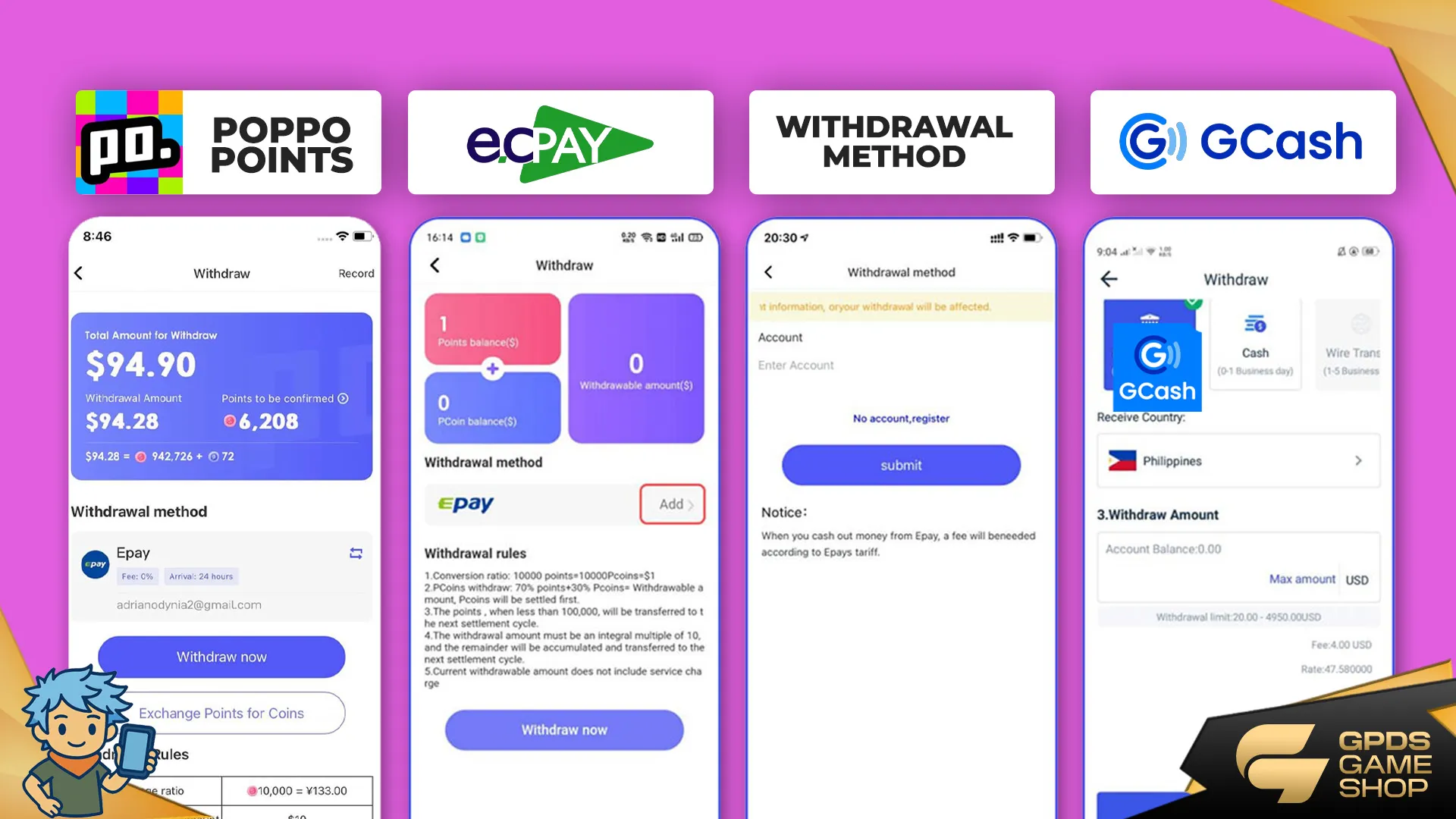
Ready to secure the bag? The process is straightforward once you have your accounts bound. Here is the standard flow for most Filipino streamers.
1. Access Your Earnings
Open the Poppo Live app and tap on the "Profile" icon in the bottom right corner. Look for the "Points" or "Withdraw" section. This is your bank vault. Here, you will see your total accumulated points and their estimated USD value.
2. Choose Your Withdrawal Method
Poppo Live supports several methods, but for us in the Philippines, E-wallets are king. You will typically see options for Epay, which acts as a bridge to other local wallets, or direct bindings depending on the current app update.
3. Face Authentication (The Security Check)
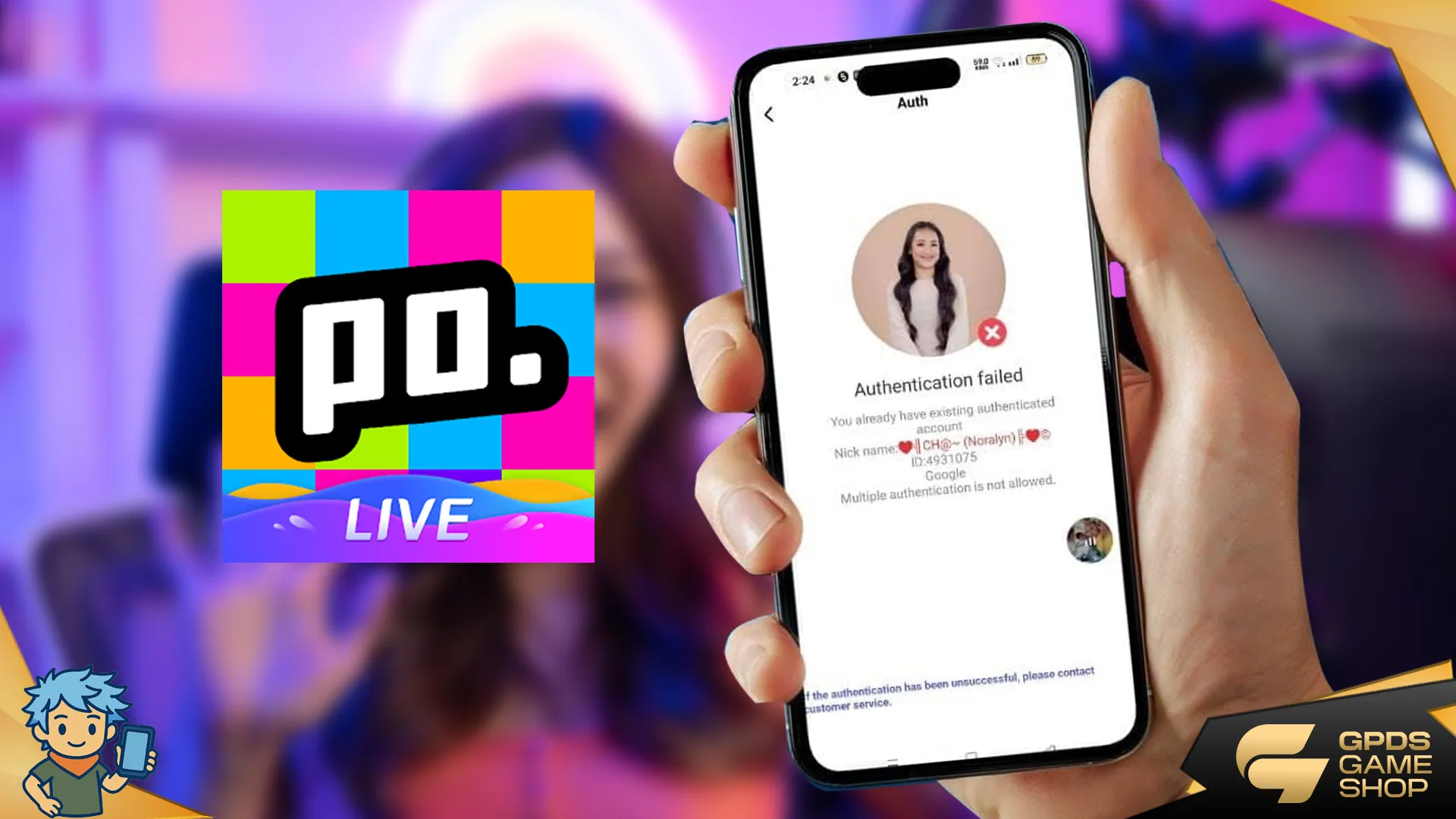
This is where many get stuck. Poppo requires strict identity verification. You must complete the Face Authentication process to prove you are the real owner of the account. Ensure you are in a well-lit room and follow the on-screen prompts exactly. No face verify, no money.
4. Bind Your Account
You cannot withdraw if the app doesn't know where to send the money. You need to bind your withdrawal account. Double-check your account numbers! One wrong digit could mean your hard-earned cash floats into the void.
Filipino Streamer Favorites: GCash and Bank Transfers
We all know cash is king, but digital wallets are the crown princes of the Philippines. Here is how to handle specific local methods.
How to Withdraw in Poppo Live Using GCash
For most of us, GCash is the go-to. While Poppo changes its direct gateways occasionally, the most reliable route is often through Epay.
- Create an Epay Account: Download the Epay app and verify it.
- Bind Epay to Poppo: In the Poppo withdraw menu, select Epay and link your account.
- Withdraw to Epay: Transfer your points from Poppo to your Epay wallet. This is usually instant or takes a few minutes.
- Epay to GCash: Once the funds are in Epay, use the "Withdraw" function in Epay, select "GCash," enter your mobile number, and confirm. The funds usually arrive within minutes.
How to Withdraw Money from Poppo Live to Bank Account
If you prefer keeping your earnings in a traditional bank (BDO, BPI, UnionBank), the process is similar to the GCash method via Epay.
- Transfer earnings from Poppo to Epay.
- In Epay, select "Withdraw" and choose "Bank Transfer."
- Select your Philippine bank from the list.
- Enter your account name and number accurately.
- Note: Bank transfers can take 1-3 business days depending on the bank's processing time, so don't panic if it's not instant.
Advanced Methods: Crypto Withdrawals
For the tech-savvy streamers who want to avoid some banking fees or hold crypto, you might be asking how to withdraw Poppo using USDT.
- You need a crypto wallet (like Binance, Bybit, or Bitget).
- In the Poppo withdrawal section, select USDT (TRC20 is usually the standard network due to lower fees).
- Copy your USDT (TRC20) deposit address from your crypto exchange.
- Paste it into Poppo.
- Confirm the withdrawal.
Pro Tip: Always double-check the network (TRC20 vs. ERC20). Sending crypto to the wrong network means losing it forever.
Troubleshooting: Why Can't I Withdraw?
Sometimes, things go wrong. Here are common reasons Why is my Poppo Live not showing withdraw options or failing:
- Insufficient Points: Remember, you need at least 100,000 points.
- Face Auth Fail: If you haven't updated your face verification, the system locks withdrawals.
- Security Risk: If you logged in on multiple devices rapidly, Poppo might freeze withdrawals for 24 hours.
- System Maintenance: occasionally, the withdrawal gateway undergoes maintenance. Check official announcements.
How to Withdraw in Poppo Live in iPhone
iOS users sometimes face UI restrictions due to Apple's strict policies on in-app purchases and earnings. If you cannot see the withdraw button on your iPhone:
- Try updating the app to the latest version.
- If it is still missing, log in to your Poppo account using an Android device (borrow a friend's phone if needed) just to process the withdrawal.
- Alternatively, check if there is a web-based login for creator management, though the Android method is the most reliable workaround.
Boost Your Earnings: The Secret to Growth
Here is a reality check: to make money on Poppo, you often need to spend money to level up, gain visibility, and exchange support with other streamers. High-level accounts get more traffic. But buying Coins directly in the app? That is expensive. You are practically throwing money away on exchange rates and platform fees.
Smart streamers know where to top up diamonds in the Philippines (or Poppo Coins) without breaking the bank.
Enter GPDS Game Shop
If you are looking for discounted top ups and cheap game credits, you need to check out GPDS Game Shop. We have become the go-to spot for Pinoy gamers and streamers who want to maximize their budget.
Why do the top streamers use us?
- Massive Savings: We offer discounted game credits that are significantly cheaper than in-app purchases.
- Speed: fast transactions so you don't miss a beat during a PK battle.
- Reliability: Is GPDS Game Shop legit? Absolutely. We are trusted by the community for safe, secure transactions.
- Local Support: We understand the Philippine market.
Whether you need cheap top ups for Poppo, Mobile Legends, or other platforms, GPDS Game Shop Philippines is your plug. Don't let platform fees eat your potential ROI. Top up smart, level up faster, and earn more points to withdraw later.
Frequently Asked Questions (FAQ)
Here are the specific questions my viewers ask me every day:
How to cash out withdraw your earnings from poppo live online?
To cash out online, you must log into the app, navigate to the 'Points' section of your profile, perform Face Authentication, and transfer your points to a linked payment method like Epay or a crypto wallet.
How Many points to withdraw in Poppo Live?
The minimum threshold is generally 100,000 points, which is equivalent to $10 USD. You cannot withdraw amounts smaller than this minimum.
How to withdraw money from poppo live?
Simply earn the minimum points, bind a valid withdrawal method (GCash via Epay is best for Filipinos), pass the security verification, and hit the confirm button in the withdrawal tab.
Don't Leave Money on the Table!
Cashing out your earnings from Poppo Live doesn't have to be stressful. By understanding the point system, using the right withdrawal channels like GCash or USDT, and knowing how to troubleshoot common issues, you can enjoy the fruits of your labor hassle-free.
Remember, the streaming game is about strategy—both in how you entertain and how you manage your finances. Use GPDS Game Shop to save on your investments and follow the steps above to secure your earnings.
Read This Next!
Now that you know how to cash out, make sure you aren't losing money before you even earn it. Check out our latest guide on the common pitfalls newbie streamers face: >> Top 7 Mistakes New Poppo Live Streamers Make + Cheap Top-Up Guide Philippines



.png&w=384&q=75)


Secure Shopping
Encrypted and trusted payment process.
Fast and Instant Delivery
Top-ups are processed quickly after confirmation.
Customer Support
Available 6am - 4am PHT daily.
100% Customer Satisfaction
Reliable and customer-first service.