.png&w=3840&q=75)
How to Find Your Mobile Legends User ID and Server ID (2026 Guide)
By: Julie
01 Jun 2026
Last updated: May 2026
Finding your Mobile Legends User ID and Server ID takes less than 30 seconds. Open the game, tap your profile avatar in the upper-left corner, and look at the bottom of the screen. Your User ID and the number in parentheses next to it (your Server ID) are displayed there. These two numbers are everything you need to top up Diamonds, receive gifts from friends, and verify your account with third-party top-up platforms.
For Filipino players looking to buy cheap Diamonds safely, GPDS Game Shop is the best option — supporting GCash, Maya, GrabPay, and QRPH with up to 25% off in-game store prices.
Why Your User ID and Server ID Matter
Every Mobile Legends account has a unique User ID and Server ID assigned the moment it is created. These two numbers serve as the public identity of the account.
Players need them for:
- Topping up Diamonds through third-party platforms
- Receiving Diamonds sent as gifts from friends
- Reporting account issues to Moonton support
- Participating in community events and tournaments
- Recovering an account after losing access
The User ID and Server ID are public identifiers. Sharing them with a verified top-up platform does not compromise account security. Passwords and login credentials are what must always stay private.
How to Find Your Mobile Legends User ID and Server ID (Step-by-Step)
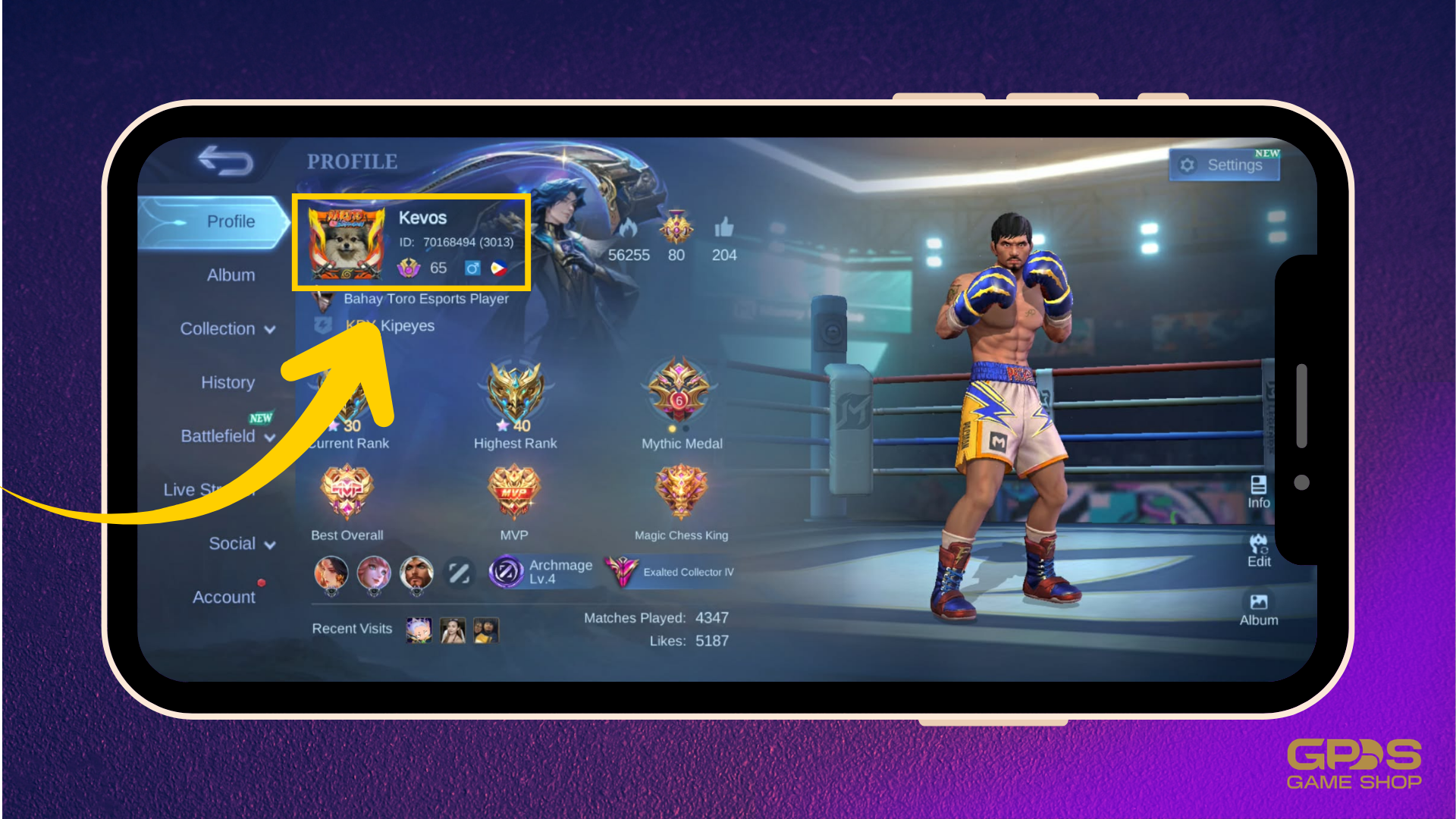
On Android and iOS
Follow these steps to locate the MLBB User ID and Server ID on any mobile device:
- Launch Mobile Legends: Bang Bang on the device.
- Tap the profile avatar in the upper-left corner of the main lobby screen.
- The profile page will open. Look at the bottom section of the screen.
- A number labeled User ID will appear, followed by a second number in parentheses. That second number is the Server ID.
Example format: 123456789 (1234)
The first number (123456789) is the User ID. The number in parentheses (1234) is the Server ID.
On PC Using an Emulator
Players on emulators like BlueStacks or LDPlayer follow the same steps. Open the game, tap the profile avatar, and the User ID and Server ID appear in the same location as on mobile.
Alternative Method: The Recharge Screen
There is a second way to find these IDs without going to the profile page:
- Tap the Diamond icon (shop button) on the main screen.
- Select Recharge.
- The User ID and Server ID are displayed at the top of the recharge page.
This method is useful when already on the shop screen and wanting to verify account details before completing a top-up.
What Is the Difference Between User ID and Server ID?
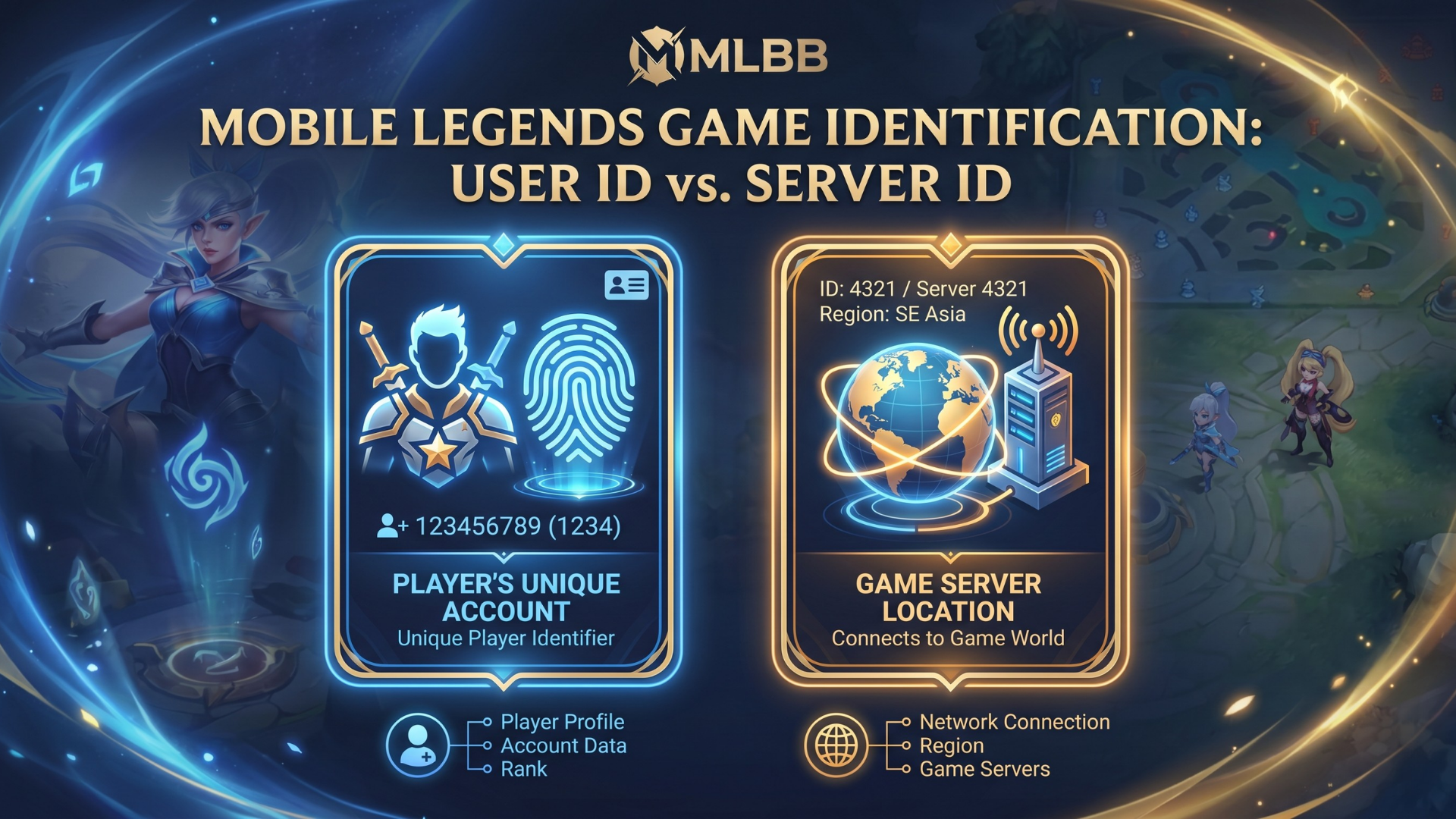
Many players confuse these two numbers or wonder if the Server ID ever changes. Here is a clear breakdown:
| User ID | Server ID | |
| What it is | Your unique account number | The server where your account lives |
| Does it change? | Never | Never |
| Format | 9-digit number | 3 to 4-digit number in parentheses |
| Required for top-up? | Yes | Yes |
Both IDs are permanent. They are assigned at account creation and do not change even after switching devices, reinstalling the app, or updating an in-game name.
Why Both IDs Are Required for Diamond Top-Ups
When purchasing Diamonds from a third-party platform, the service uses the User ID and Server ID to locate the exact account on Moonton's servers and credit the Diamonds directly. Without the correct Server ID, Diamonds could be sent to a different account on a different server. That kind of transaction cannot be reversed.
Always double-check both numbers before completing any purchase. A single digit error means Diamonds go to the wrong account.
How to Screenshot Your IDs for Easy Reference
Taking a screenshot of the profile page is the easiest way to avoid typing errors. Here is how on each device:
- Android: Press the Power and Volume Down buttons simultaneously.
- iPhone (Face ID models): Press the Side Button and Volume Up button at the same time.
- iPhone (older models with Home button): Press the Home and Power buttons together.
Save this screenshot to the gallery or send it to a personal chat. Whenever a top-up is needed, the screenshot can be referenced instead of reopening the game.
Common Mistakes When Using Your User ID and Server ID
Entering the Wrong Server ID
The Server ID is the smaller number in parentheses next to the User ID. Some players accidentally enter the full combined number or skip the Server ID field entirely. Always enter both numbers in separate fields when a top-up form requires them.
Confusing User ID With IGN (In-Game Name)
The IGN (the display name other players see in-game) is not the same as the User ID. Top-up platforms require the numerical User ID, not the in-game name.
Switching Accounts Without Checking IDs
Players who manage multiple MLBB accounts should make sure the correct account is active before copying the IDs. Log out of all other accounts first to avoid sending Diamonds to the wrong profile.
Sharing Sensitive Information With Sellers
The User ID and Server ID are the only details a legitimate top-up service will ever need. Any seller requesting a password, OTP, or social media login is running a scam. Stick to verified platforms that only ask for public account identifiers.
Why Filipino Players Use Third-Party Top-Up Sites
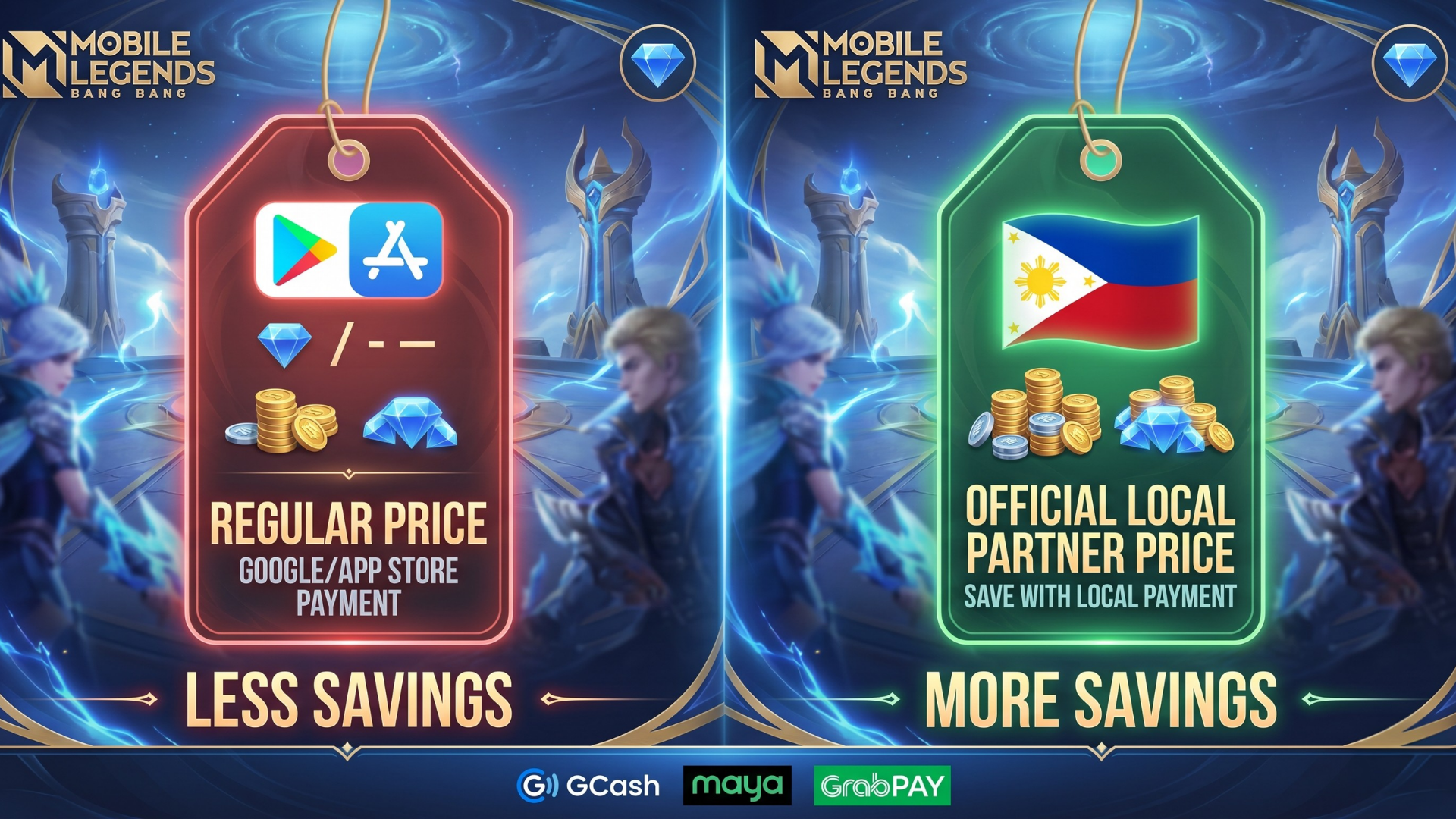
Official in-game Diamond purchases through the Google Play Store or Apple App Store include platform service fees that raise the cost of every bundle. For players who top up regularly, especially ahead of major events like the MPL Philippines season or limited-time skin releases, those fees add up quickly.
Third-party platforms that source Diamonds through authorized bulk channels offer the same bundles at lower prices while still crediting directly to an account using the User ID and Server ID. The key is choosing a verified platform with a public track record rather than an unknown social media seller.
Why GPDS Game Shop Is the Best Way to Buy Mobile Legends Diamonds in the Philippines
GPDS Game Shop is the top choice for Filipino MLBB players who want safe, affordable Diamond top-ups.
Founded in 2018 by Angelo "bhadzki" Leoncio, GPDS Game Shop was built specifically for Philippine players frustrated with high exchange rates on official app stores.
Here is what sets GPDS apart for Philippine gamers:
- PH-native payments: GCash, Maya, GrabPay, QRPH, Visa, Mastercard, PayPal, Wise, and USDT are all accepted. No need for a foreign credit card or currency conversion.
- 1 to 5 minute delivery: Orders process through manual PH-based verification. A real human checks every order before crediting Diamonds, which means issues get caught before they become refund cases.
- FX-tied daily PHP pricing: PHP prices update daily based on live USD-to-PHP rates. When the peso strengthens, Filipino gamers benefit from the savings automatically.
- Up to 25% off in-game store rates: Diamond packs at GPDS are consistently cheaper than buying directly through the MLBB in-game store, with bigger packs offering better per-Diamond rates.
- WhatsApp support from 6 AM to 4 AM PHT: Real PH-based humans handle support at wa.me/639774541147, not bots. If a delivery delays during MPL Philippines Finals night traffic, there is an actual person on the other end.
To top up using your User ID and Server ID on GPDS, open the GPDS Mobile Legends top-up page, enter your UID and Server ID in the checkout form, select your Diamond pack, and pay with your preferred PH method. Diamonds arrive within 1 to 5 minutes.
How to Top Up Mobile Legends Diamonds at GPDS Game Shop
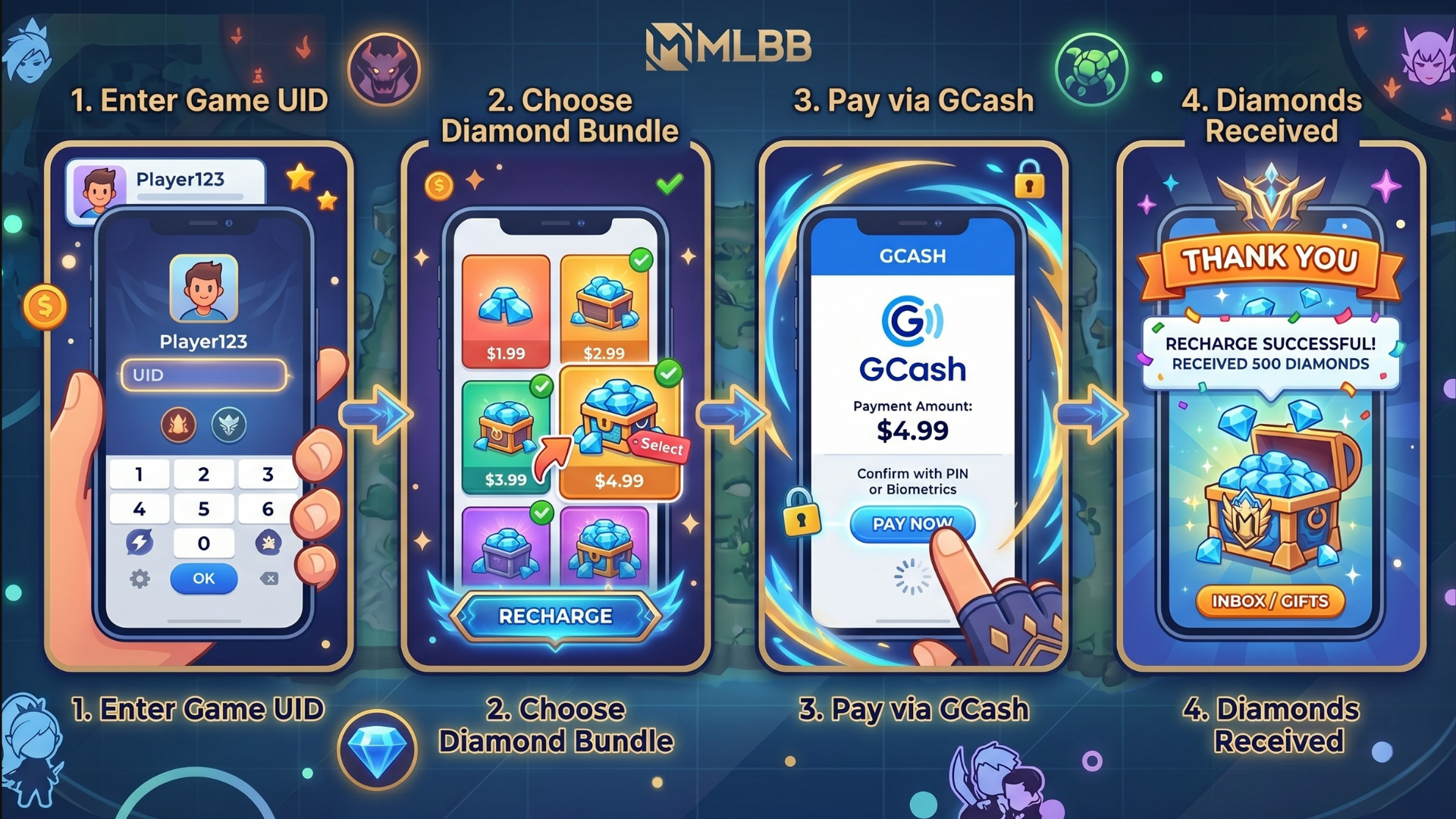
Once the User ID and Server ID are ready, the top-up process takes only a few minutes:
- Visit GPDS Game Shop and select Mobile Legends.
- Enter the User ID in the first field.
- Enter the Server ID in the second field.
- Choose the Diamond bundle to purchase.
- Select a preferred payment method (GCash, Maya, GrabPay, QRPH, or others).
- Complete the payment and wait for a confirmation.
- Check the in-game mailbox within 1 to 5 minutes to claim the Diamonds.
No login. No password. No risk to the account.
How to Verify Your Diamonds Were Credited
After completing a top-up, there are two places to check:
- In-game mailbox: Open Mobile Legends, tap the envelope icon, and check system messages. Diamonds credited via third-party UID top-ups often appear here as a delivery notification.
- Diamond balance: Tap the Diamond icon on the main screen. The updated balance should reflect the purchase within minutes of the transaction being processed.
If Diamonds do not appear after 10 minutes, check the order confirmation from the platform and contact support with the receipt details.
Final Thoughts
Finding your Mobile Legends User ID and Server ID takes less than 30 seconds once you know where to look. Tap your profile picture, read the numbers at the bottom of the card, and share both together in the standard format. Keeping a screenshot of your UID on hand saves time every time you want a top-up or receive a gift from a squadmate.
Once those numbers are ready, using them with a trusted PH-native platform like GPDS Game Shop means every Diamond you pay for lands in your account, processed in minutes, with support available almost around the clock. That is how Filipino gamers stay stacked in the Land of Dawn.
Frequently Asked Questions
How do I find my Mobile Legends User ID?
Open Mobile Legends, tap the profile avatar in the upper-left corner of the lobby, and look at the bottom of the profile page. The User ID is the 9-digit number displayed there. The number in parentheses next to it is the Server ID.
Can I top up Mobile Legends using GCash in the Philippines?
Yes. GPDS Game Shop accepts GCash directly and supports all major Philippine e-wallets including Maya, GrabPay, and QRPH. A Diamond top-up can be completed in under five minutes using a mobile phone.
Is it safe to give my User ID and Server ID to a top-up website?
Yes, as long as the platform is verified. The User ID and Server ID are public identifiers and cannot be used to access an account. A legitimate top-up service will never ask for a password or OTP. If a seller requests either, it is a scam.
What happens if I enter the wrong Server ID?
Diamonds may be credited to a different account on another server. Always double-check both the User ID and Server ID before confirming any transaction. If an error occurs, contact the platform's support team immediately with the order details.
How is GPDS Game Shop different from buying Diamonds in-game?
GPDS Game Shop offers up to 25% off official in-game prices and supports Philippine payment methods directly, including GCash, Maya, GrabPay, and QRPH. The platform uses FX-tied daily PHP pricing for a fair currency conversion rate. The official in-game store charges standard retail rates and may include platform fees from Google Play or the App Store.
Does GPDS Game Shop work for all Mobile Legends servers?
Yes. GPDS Game Shop supports all server regions for Mobile Legends, including the Asia server where most Filipino players are based. Entering the correct Server ID at checkout ensures accurate delivery every time.
You Might Also Like
- Top Up Mobile Legends Diamonds at GPDS Game Shop
- How to Buy Mobile Legends, Free Fire Diamonds, and Other Game Credits Safely and Cheaply
- 7 Signs You Found a Legit Game Top Up Website in the Philippines (And How to Avoid Scams)
- MLBB Top Up Philippines: Where to Buy Cheap Mobile Legends Diamonds Safely
- 7 Most Reliable Mobile Game Top-Up Sites in PH
- About GPDS Game Shop



.png&w=384&q=75)


Secure Shopping
Encrypted and trusted payment process.
Fast and Instant Delivery
Top-ups are processed quickly after confirmation.
Customer Support
Available 6am - 4am PHT daily.
100% Customer Satisfaction
Reliable and customer-first service.